
Helping new homeowners, one air filter at a time.
My Role: UX Designer and UX Strategist
Tools: Axure and Sketch
Deliverables: Wireframes, prototype, site map, usability test, competitive analysis and insights
Laying the Foundation
Homebuddy is a website streamlining homeowners’ preventative maintenance by connecting them with service professionals through a custom maintenance plan and automatic maintenance reminders. Homebuddy saves homeowners time and money by making preventative maintenance simple.
Still in its alpha stage, Homebuddy’s founder, Ryan, connected with my team of three UX designers so we could help him make Homebuddy a trusted and indispensable tool for users. Ryan was motivated to create Homebuddy by his own frustration that there wasn't a simple way for homeowners to stay up to date on home maintenance.
Ryan had already conducted a lot of research. He surveyed 100 Chicago homeowners and even compiled a detailed report assessing his competition. There were three major avenues Ryan wanted us to research further. First, he wanted my team and me to find out how Homebuddy could build trust with users despite being new to the market. Next, he wanted us to discover how would users prefer to create reminders and tasks for preventative maintenance and connect to a curated list of professionals. Finally, we set out to find the best way Homebuddy could partner with home inspectors so they could recommend Homebuddy to their clients. Trust between Homebuddy and its users was something also stressed by Ryan. He wanted to make sure we were building a platform that users would trust with their home’s wellbeing.

Current homepage: The opportunity with Homebuddy’s homepage was creating an experience for the user both tailored to the individual while at the same time created a sense of trust. While the original homepage was simple and easy to visually scan, it was lacking in giving the user a sense of authority and trust.
With our client’s research to guide us, we wanted to dig deeper through a series of interviews with potential users to uncover opportunities and gaps Homebuddy could fill. Through these discoveries, we then identified the incentives users look for to return. We also wanted to understand how homeowners preferred to schedule maintenance, but first we wanted to find out whether they did so and, most importantly, how we could build trust.
Together, my team also wanted to explore several avenues of inquiry to learn how homeowners prefer to schedule maintenance and how they’d like to schedule service, whether on their own or through a maintenance concierge. We also wanted to understand how homeowners evaluate maintenance providers, what tools and platforms they use, how they approach doing maintenance themselves, and how they learned what they know.
To immerse ourselves in the world of home maintenance, my team and I took a deep dive into what was currently out there and how Homebuddy could stand out in both value and unique features.
Before we interviewed users and home maintenance experts to get their perspective, we first assessed what was already on the market. We looked at HomeBinder, Porch, HomeZada, Homespot, and Dwellbeing; all products offer some form of home maintenance tracking. The first four products offered users a mix of features, including maintenance reminders, DIY instructions, and ways to connect to service professionals. However, none of them offered all of these services in one package.
Dwellbeing, however, offered all of these services for both desktop and mobile. While still in beta, Dwellbeing definitely appeared to be everything Homebuddy wanted to be: a platform that simplifies and prioritizes home maintenance by giving users timely maintenance reminders, connecting them with service professionals, and offering quality content.
The Appraisal

Dwellbeing: Of all the companies in the home maintenance market we surveyed, Dwellbeing offered many of the features Ryan wanted.
One major differentiating factor was that Dwellbeing was part of Liberty Mutual Insurance and, while free to use, collected all its users’ information without explaining why or for what purpose. At first, my team and I were hesitant to present our initial finding—Dwellbeing was doing exactly what Homebuddy set out to do—but once we realized trust, a huge part of Homebuddy’s mission, was missing from Dwellbeing, we had what would differentiate the two.
Just by assessing the competition, I learned about all the parts of a house that need regular attention. And through desktop research, I learned even more. One fact jumped out from my research was a homeowner survey from BrightLocal. This survey reported that while 90% of homeowners believe they are “vigilant” or do an “okay” job of protecting their home, 64% have failed to update their home protection strategies in the past. Knowing Ryan told us the people he talked to said they wait for something to break before spending any money on their home, it would be interesting for my team and me to talk to homeowners and see whether they match these survey results.
Both experts we spoke with were home inspectors in Chicago. Our main focus in these two interviews was to learn what role they see themselves playing during the home-buying process and how (or even if) they build trust with their customers. We also wanted to understand whether home inspectors refer customers to businesses or partner with them in any way, and whether they help customers after the assessment.
Meeting the Neighbors
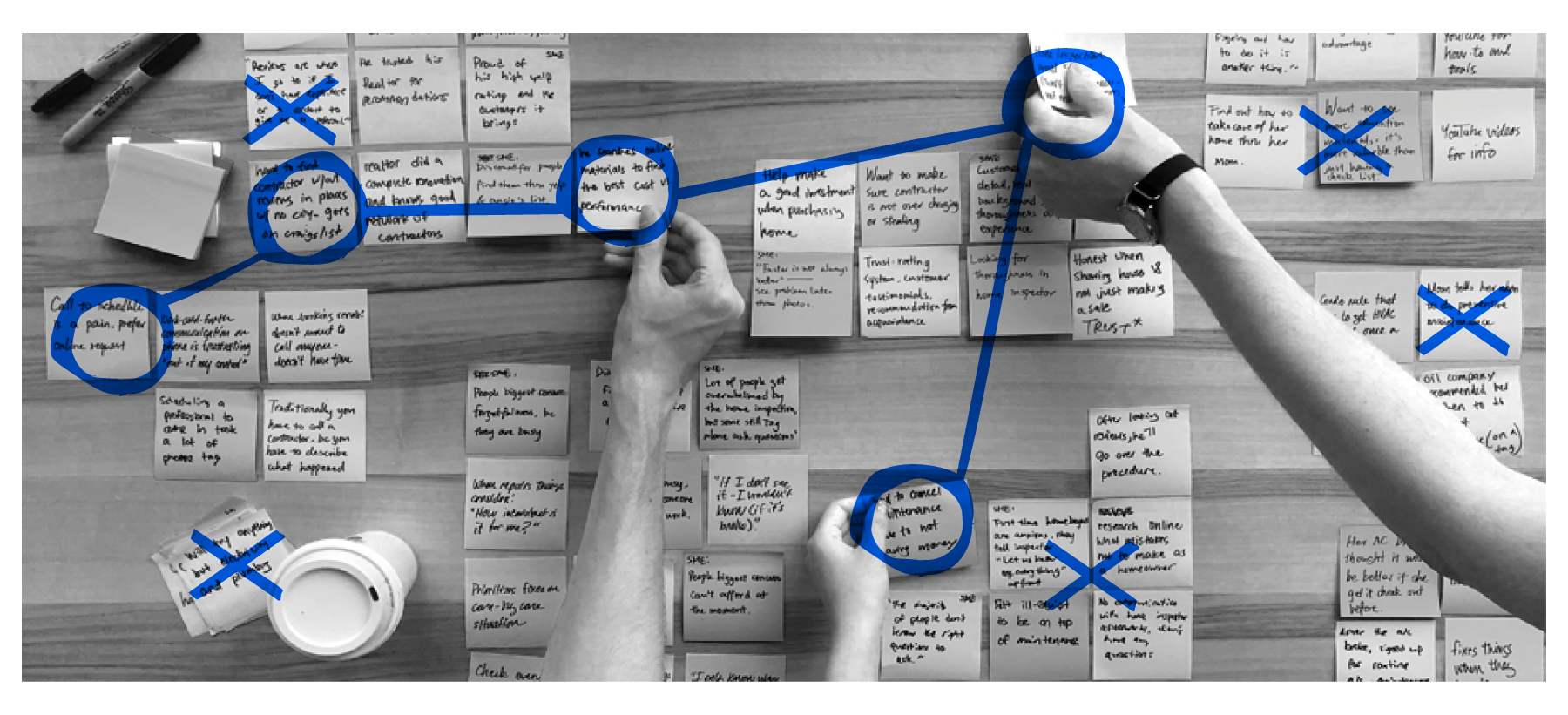
Discovering and Documenting: From already existing users of Homebuddy, we were able to discover opportunities after the home-buying process. We also learned from experts in the field about how to better understand where Homebuddy could step in and be the most helpful.
The most interesting thing we gleaned was while home inspectors are "being paid for delivering bad news", as one inspector put it, they didn’t necessarily build a strong relationship with homeowners. Nor, we learned, did they make recommendations on how homeowners could repair any potential problems with their house, nor do they recommend a service professional—they simply assessed the potential problems. If, during the inspection, a homeowner asks about a recommendation then they have no problem divulging someone they trust. However, this seemed to not happen as often as we had assumed. Another interesting point was one inspector would be “surprised to see a well maintenance house”, which matched with Ryan’s assumption most people don’t do preventative maintenance with their homes.
The temporary relationship home inspectors have with homeowners was also reflected in what we heard from homeowners. We talked with seven homeowners between the ages of 25 and 39 and confirmed a few of our assumptions, as well as some understandings were surprising.

Trust: When people find a realtor has their best interests in mind, they go to them for needs after the sale. How responsive realtors are to potential homebuyers generates a lot of confidence in their clients. Users want a trusted source to educate them on what they need to know as first-time homeowners. As one person we talked to said: “When I bought my house, I wanted to keep it in the best condition possible—but I had little to no experience with those things.”

Scheduling: People use their calendar to track their schedule and tasks, especially Google Calendar. We found that everyone we spoke with uses Google Calendar to schedule everything throughout their day. Regarding scheduling, we found that users also want the option to choose specific times to book a professional. As one homeowner said: “I don't have time to sit on the phone for 20 minutes.”
Priorities: People only start to care about preventative maintenance after something breaks. The homeowners we talked to consistently said they “only know when something is broken is when it’s not working.” While users want to do preventative maintenance, they don’t always have the funds. “It’s all about money”, several of them said.

Assessment: When choosing between DIY and hiring a professional, users value guidance on deciding. One user stated, “If you want to keep your marriage, hire someone else,” when talking about letting a professional install their new floors. For DIY projects, users want a step-by-step guide for the task. “When I tried to install something myself, having a clear understanding would have really helped me.”
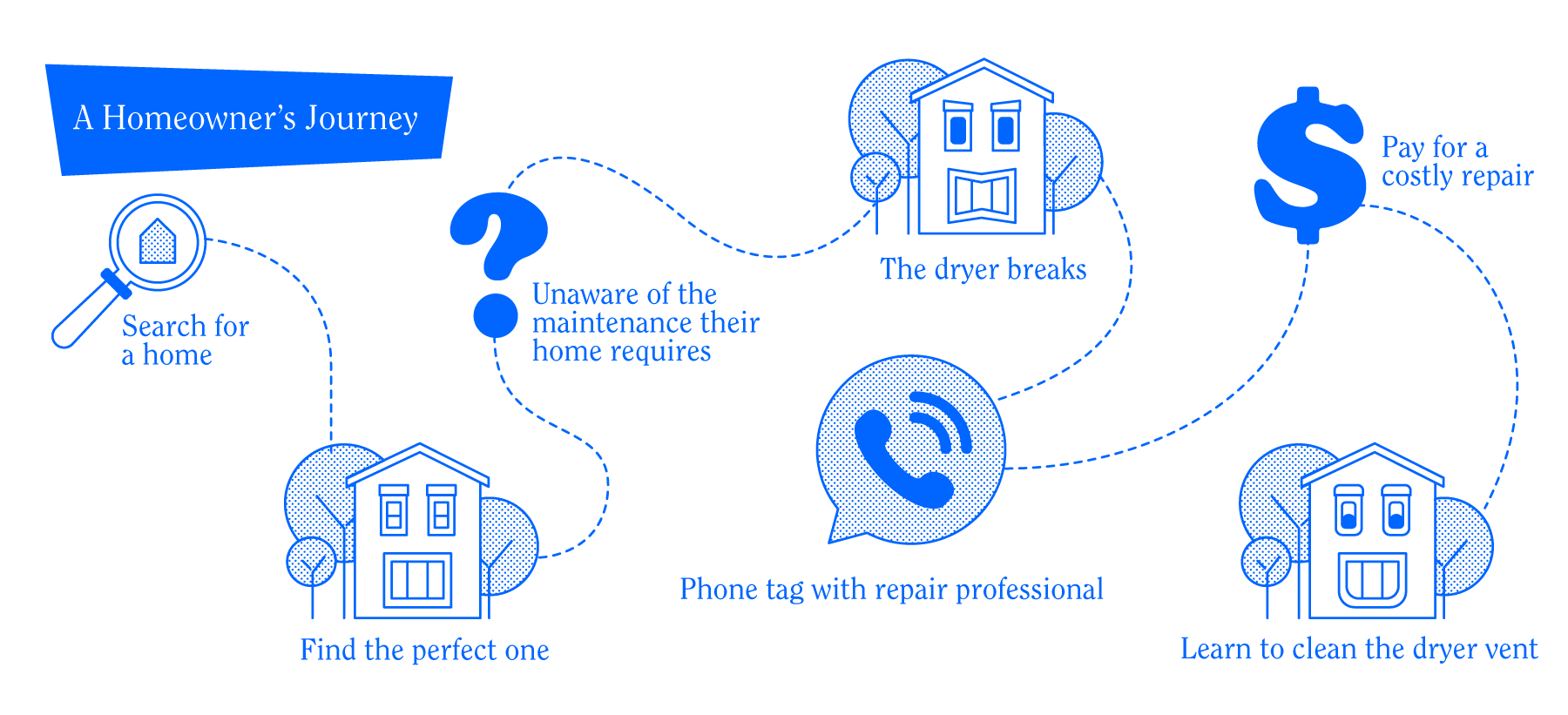
After categorizing these insights from users we were able to craft actionable goals moving forward so we could find the overarching opportunities for Homebuddy. Mapping out a user's path (feature above) helped my team and I zero in on when Homebuddy would be the most useful. When we reviewed our user’s journey from buying a house all the way through keeping up-to-date with preventative maintenance we found three major opportunities:
The Floorplan
Partnering with local realtors, who can offer our service.

Creating a comprehensive home maintenance guide for homeowners.

Streamlining scheduling between homeowners and service professionals.

This opportunity was paired with several insights we found through our users and experts. Partnering with realtors was something no one expected; however, all of our homeowners told us how valuable their realtor was and how they became a trusted source of information when new homeowners needed recommendations for repairs or other home maintenance. Ryan assumed house inspectors were an integral part of the homeowner’s journey, but it was actually their realtors. Knowing this helped us realize that, when building trust between Homebuddy and users, the first entryway could be realtors, since they build relationships with clients throughout the homebuying journey, unlike home inspectors, who are in their lives for a few hours at most.
Also, while realtors were a trusted source of information, homeowners also sought out DIY instructions from online sources. While there are a lot of videos and instructions out there, our users voiced their frustration with not having one trusted source for this information. This was another opportunity for Homebuddy to position itself by providing comprehensive tutorials and guides through a membership, or even simply as a supplement to signing up on the platform. While the original Homebuddy site had a few articles about home repair and upkeep, Ryan had an opportunity to establish his business as a trusted source by providing a comprehensive database of articles, videos, and how-tos for users.
Scheduling was also important when homeowners spoke about repair frustrations. Many shared experiences with having to wait for service or being completely lost in the process. Once again, Homebuddy could step in by providing a single platform for users to not only learn about preventative maintenance, but also to schedule a service professional.
These three concepts helped my team develop our problem statement: “First-time homeowners need a streamlined guide on preventative maintenance that helps them effortlessly manage both professional and DIY projects so they can care for their home and avoid expensive repairs.”
With our main points for opportunity identified, we then wanted to create a series of touchstones that would serve our users and inform our designs moving forward. Knowing we wanted to focus on personalization and specificity when it comes to homeowners and their homes, as well as empowering our users to maintain their new homes and giving them a sense of proactive ownership in their homes, we crafted three design principles:
Our design considers that every home and homeowner is unique, so we create an experience tailored to their individual needs and comfort level.
Every home is unique

Our design understands that first-time homeowners don’t know the ins and outs of their home, so it should make them aware of what they don’t know.
Out of sight, on your mind

Our design leverages the feeling of accomplishment and ownership new homeowners have so they can take proactive steps towards caring for their homes.
Leverage ownership
Open Concept(s)
Once we had our design principles to move us forward our team did some quick and fun brainstorming exercises and created around 20 user stories which produced over 30 unique ideas. Among our ideas were making the interaction with Homebuddy and the user granular because with two of our initial user interviews our participants were really into the process of what service professionals would be doing once they arrived at their home. These users would research what they would do, and how they would do it. However, this idea, like several others we crafted, were not indicative of our overall users. Most homeowners, we found, while wanting to have a basic understanding of maintenance, were not quite as granular in the process. Staying focused on our design principles we did a major edit of our user stories and distilled these into three unique concepts to test with homeowners. These three concepts were:

We got this: A service helps new homeowners stay on top of their schedule and automate their home maintenance.

The more you know: A product provides value by showing educational posts and articles to motivate users by helping them learn more about home maintenance.
Side by side: A website provides users with information and a starting point for research to help them make decisions.
THE MORE YOU KNOW
One key takeaway from the "More You Know" concept was that users tend to shy away from paid content. Several sidebar content boxes with videos were perceived as ads; therefore, copy would be an important factor in the final website. Since trust was central to Homebuddy’s mission, we had to ensure nothing on the website was perceived as paid content. On our home education page, we discovered users want the option to switch to a professional if a home project becomes too overwhelming. As one user stated: “Sometimes I start a project…and halfway through realize I need a professional so it’d be nice to switch on this page.”
WE GOT THIS
We featured the option to schedule a professional in one click, which is something Ryan wanted for Homebuddy and which we assumed users would respond positively to. However, we discovered users want to choose who they send to their homes for repairs and maintenance. We also wanted to remind users in a timely manner how they need to prioritize their preventative maintenance tasks. However, one feature that tested poorly with our users was streamlining the process of getting a professional to their home. Another feature that tested poorly was syncing users’ Google Calendar with Homebuddy’s calendar. Users wanted the reverse. Testing showed us that users want a say in how maintenance is scheduled, and they want a choice of which service professional will come to their home. One user said: “I’m hesitant about the assigned professionals...I would need to know how they’re vetted [by Homebuddy].”
SIDE BY SIDE
After testing We Got This, we tested Side by Side to see which path users preferred. We Got This allowed users to send a professional to their house with a few clicks, but without the choice of who came. With Side by Side, users had more involvement in how they proceeded. They could choose from a filtered list of professionals with ratings and pricing. Users definitely liked having more involvement in who came to their house.

Paper prototype feedback: Users find the comparison helpful in making decisions about their house: “This is exactly what I do in my mind…it’s nice to see it laid out for me.”
With our three concepts solidified, we did a batch of sketches together. With these concepts, we created a set of paper prototypes to test with users.
Give users options when deciding between DIY and hiring a pro. This feature ties in with Out of Sight, On Your Mind, which strives to educate and empower homeowners to stay on top of home maintenance.
Timely reminders on the homepage with a prioritized task list, which will allow users to be a part of keeping up with their maintenance through our Every home is unique design principle.
Emphasizing educating the user without upselling and offering a diverse choice of learning methods goes back to our initial opportunity—streamlining the process while building trust between Homebuddy, users, and service professionals.
Another insight we got from users was that maintenance and repair can happen spontaneously and don't necessarily need to be pre-planned. One of Homebuddy’s initial business propositions was to create a maintenance kit plan, like air filter delivery tailored to how often a particular home needs filters, or delivery of specific tools homeowners would need for DIY maintenance. However, after testing and realizing repairs and maintenance are not always planned, we realized that if Homebuddy was going to ship homeowners supplies, it might not be as time- and didn’t work with our three concepts, we created a checklist of what our final converged wireframe prototype would includefficient as the homeowner going to Home Depot or ordering something from Amazon and getting it within hours or a day or two.
After assessing what did, and didn’t, work with our three concepts, we created a checklist our final converged wireframe prototype would feature. Those features included:
Final Walkthrough
Breaking our mid-fidelity wireframe into five tasks, we asked our group of four homeowners to provide honest feedback as they completed each one.
The first task was to complete the onboarding process, which consisted of seven screens, each with a multiple-choice question presented on cards. These questions helped users customize their home maintenance plan.
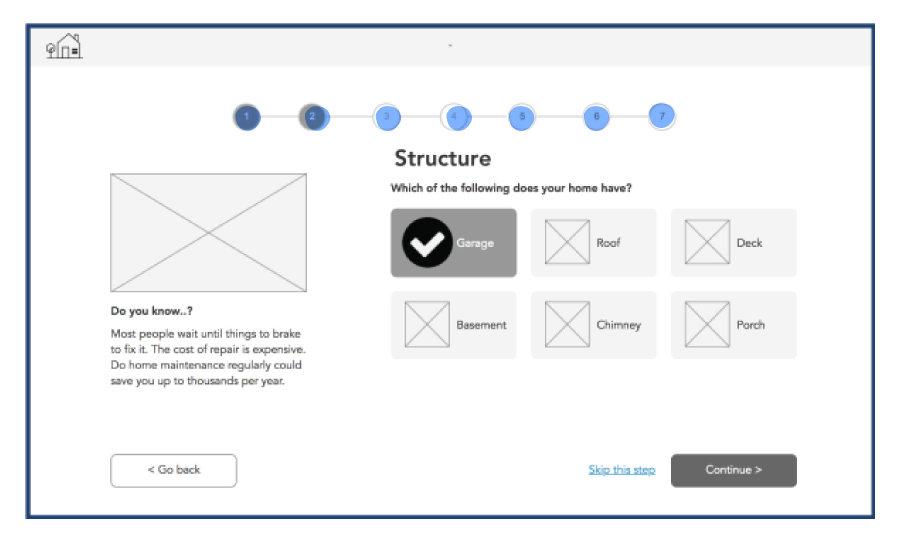
Onboarding: Even though the onboarding process had seven steps, users felt it was just the right length. They also tested positively to the tips and facts accompanying each step. One user said, “It made me think of things that I didn’t know I had to do maintenance on.”
The second task was an overall assessment of the homepage/dashboard. This page included a home maintenance checklist, along with the option to do the tasks DIY or request a service professional.

Homepage: Users enjoyed checking off their tasks because, as one user said, “It makes me feel good to see what tasks I’ve completed.”
Users responded most positively to the checklist because it made them feel, as one user stated, “good to see what tasks I’ve completed”. The side-by-side comparison also performed well because it put decisions in users' hands. The homepage also featured a subscription feature that users had mixed reactions to: “The air filter delivery would be something I’d look at, but I wouldn’t want to pay a ton more for. I could get filters delivered through Amazon.”
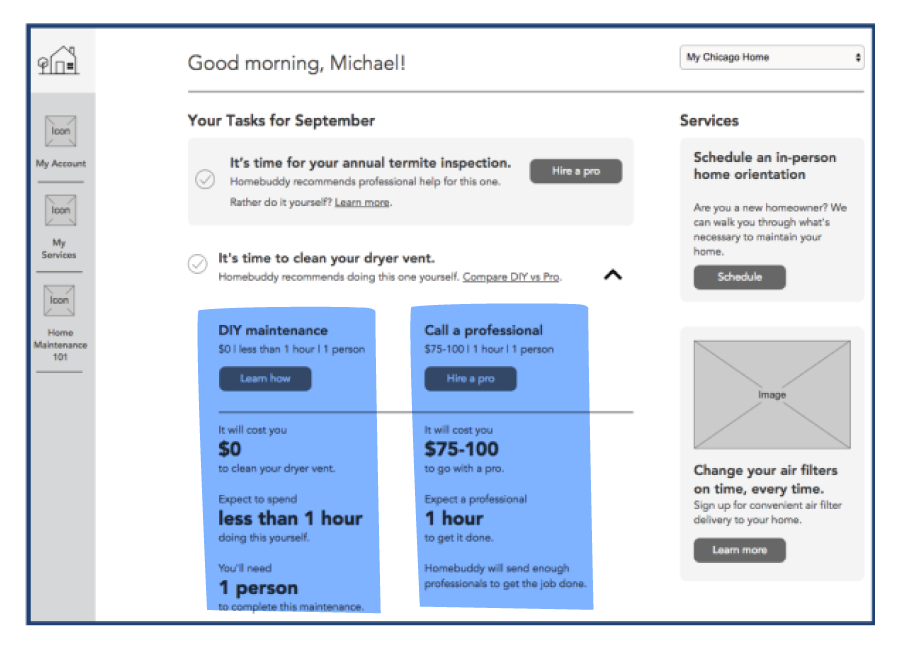
Hire a Pro: Users liked the option to choose a professional based on reviews and price. They also stated that they would pay a premium for professionals who have been guaranteed by Homebuddy.
The fourth task was visiting the DIY page of Homebuddy. Here users were able to evaluate a list of instructions, along with a placeholder for an instructional video.

DIY: Users appreciate the option to “switch to pro” at any time, but they wanted difficulty levels tied to each task and how that was calculated.
Overall, users found the page helpful but wanted a difficulty level for each task so they could better assess if they could perform the DIY maintenance. The best tested feature of this page was the option for users to hire a pro through a sidebar CTA.
The final task, scrolling through the Home Maintenance 101 page, featured instructional and informational articles and videos. Users envision “Home 101” to be a catalog of home maintenance with an easy search function. One user said: “If this page updated daily, you will have all my traffic.”
Users did suggest we chunk the content into separate categories so users wouldn’t be overwhelmed by constant,
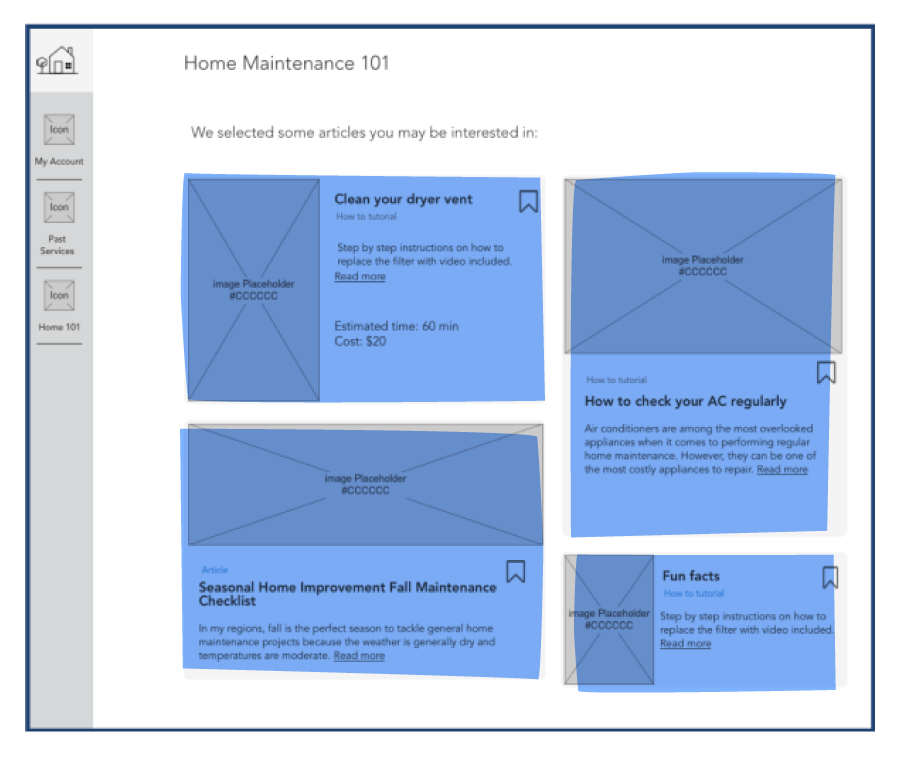
Home Maintenance 101: Users envisioned “Home 101” as a home maintenance catalog, with an easy search function. One user said “I could see myself returning to this and getting useful knowledge, which would add value for me when using Homebuddy.”
After testing our wireframes, we were able to pull overarching opportunities for future recommendations for Homebuddy which included:
SYNCING TO GOOGLE CALENDAR
All our users used Gmail and Google Calendar so allowing them to input their scheduled home maintenance into their Google Calendar. Allowing users to create custom calendar events are specific to their Homebuddy tasks seems like an easy choice.
CONTINUE THE ONBOARDING PROCESS
Allow users to fill out more of their information after the initial onboarding would be one way Homebuddy could keep the onboarding relatively quick, while allowing users to fill out more detail once they’re acclimated to the platform.
CURATE FOR THE USER…BUT NOT TOO MUCH
My team and I recommended, based on user feedback, of having the Home Maintenance 101 page act as a library or catalog of home maintenance with good search function instead of the initial single page of content we originally designed.
These three recommendations would collectively improve Homebuddy by allowing users to integrate the product with their own daily tools, such as Google Calendar. Continuing theing onboarding process at the users’ own pace allows users not to be overwhelmed with initial onboarding and creating a more robust educational library would ensure users go to Homebuddy first thing when they have a question about maintaining their homes. Another recommendation that we didn’t discuss with Ryan was to promote the fact that users information is never given to third parties, something Homebuddy’s biggest competition, Dwellbeing, could never promise.
Housewarming
Working with Ryan to improve the Homebuddy website allowed a lot of first-time opportunities. I was able to add business strategy into the overall equation when designing for users, while at the same time being able to create final wireframes intuitive to the user while fulfilling goals set by Ryan. Through research my team and I were able to utilize user research to persuade our client to keep features of the site users unanimously favored, like incorporate reviews within the profiles of service professionals.
The entirety of this project, my final in a total of three client projects at Designation, was a victory for both myself and my team. Having collaborated with clients before our process was much more streamlined so we were able to add Ryan’s need for business strategy within our UX thinking.
The final mid-fidelity wireframes we presented were thoughtful and the homepage, which I created, was the most polished wireframe I had completed. And while this project was not without its unavoidable pivots and unexpected testing and usability results, I feel that with our future recommendations Ryan will be able to develop Homebuddy into a product that users will integrate into their lives with great success.